Spreadsheets are written for humans, not machines: what that costs when you automate
July 18, 2026ArticleArda Gürses

Every operations team we meet runs on at least one spreadsheet that outsiders cannot read. Not because it is badly made, but because it is very well made, for exactly one audience: the people who built it.
This post walks through one real example, shows what happens when software tries to read it, and explains why we think this gap is where most automation and data migration budgets quietly disappear.
A file that works perfectly
Below is an operations tracker from an air cargo business. Details are anonymized, but the structure is faithful to the original.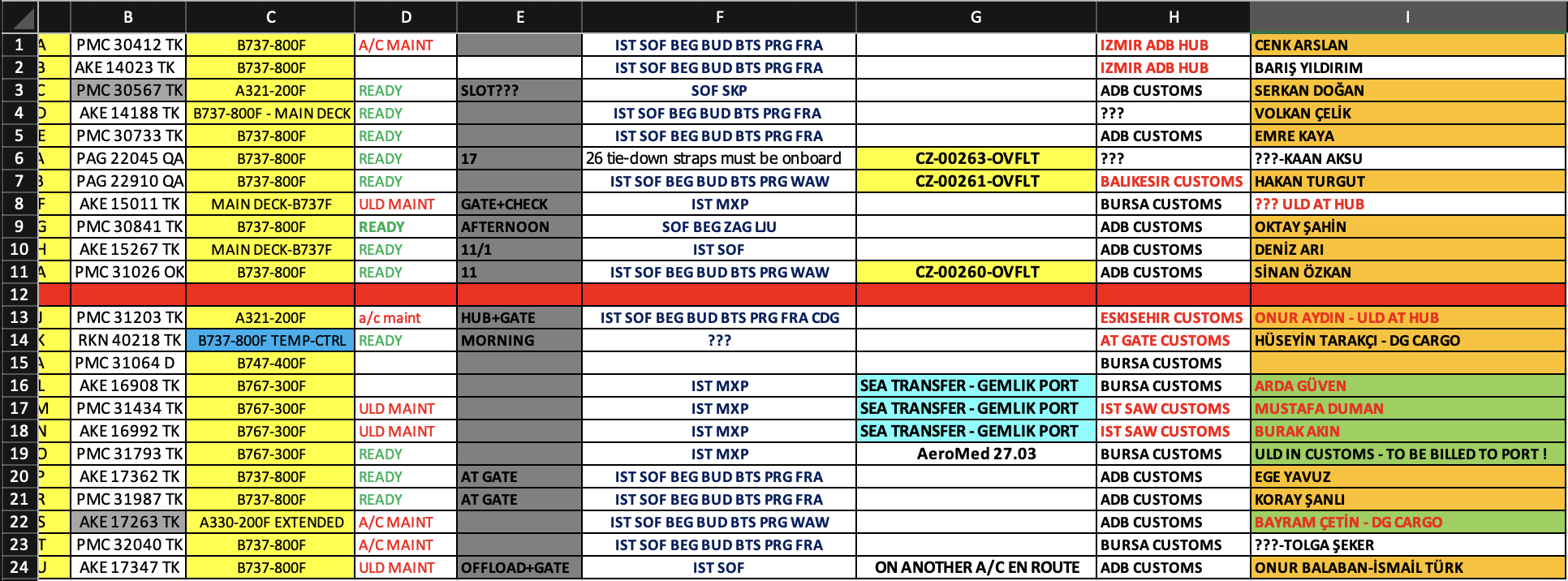
An experienced dispatcher reads this in seconds:
- Green READY means the aircraft can fly. Red A/C MAINT or ULD MAINT means it cannot.
- The solid red row in the middle is not decoration. Everything above it belongs to one department, everything below to another.
- A name in red font is a backup captain. The fill color behind each name shows which employee is tracking that flight.
- One blue cell in the aircraft column marks a temperature-controlled unit. Nobody needs a legend for it.
This is not sloppy work. It is a highly compressed visual language, refined over years, that lets a team coordinate aircraft, pallets, customs and crew at a glance. New hires learn it the way they learn any dialect: by sitting next to someone who speaks it.
That is the benefit. Here is the invoice.
What the machine sees
We loaded a structurally identical copy of this file with pandas, the standard Python tool for reading spreadsheets, using default settings. This is the honest starting point of almost every automation project:
>>> pd.read_excel("ops_tracker.xlsx")

    TC-MCA  PMC 30412 TK  B737-800F  A/C MAINT  Unnamed: 4  ...  CENK ARSLAN
0   TC-MCB  AKE 14023 TK  B737-800F        NaN         NaN  ...  BARIŞ YILDIRIM
...
10     NaN           NaN        NaN        NaN         NaN  ...  NaN
11  TC-MCJ  PMC 31203 TK  A321-200F  a/c maint    HUB+GATE  ...  ONUR AYDIN - ULD AT HUB
The first aircraft got promoted to column headers and vanished from the data, because the file has no header row: everyone already knows what the columns mean. The red department boundary became a blank row, indistinguishable from missing data. Every color is gone. And the script raised no error. It ran, produced something table-shaped, and moved on.
“Fine, just paste it into an AI then”
Fair objection. So we did. Copy the sheet, paste it into a general-purpose chatbot, ask it to make sense of the data. Here is the kind of answer you get back:
“This appears to be a flight operations tracker. I’ve identified the columns as: Aircraft Registration, Pallet Code, Aircraft Type, Maintenance Status, Slot/Gate, Route, Notes, Customs Office, Assigned Personnel. The empty row in the middle likely separates completed flights from upcoming ones. I’ve cleaned this into a structured table for you.”
This is fluent, confident, and wrong exactly where it matters:
- It guessed the boundary, and guessed wrong. The red row separates two departments, not completed from upcoming flights. Every downstream report built on that guess now assigns responsibility to the wrong team. Nothing in the answer signals that this was a coin flip.
- It never mentions colors, because it never saw them. Copy-paste strips formatting before the AI reads a single character. Backup captains, flight ownership, temperature control, unconfirmed customs: the model is not ignoring that layer, the layer never arrived. The AI isn’t failing because it is dumb. It is failing because the evidence was destroyed in transit.
- The column names sound right, which is the trap. Plausible output gets trusted. A parser that crashes gets fixed the same day; a fluent answer with a silent 20% error rate gets discovered in production, weeks later, as wrong records in a new system.
The cost nobody budgets for
Here is the pattern we see across ERP migrations and automation projects: the structure of operational data does not live in the files. It lives in the heads of the people who use them.
Every project that touches this data pays a recovery tax first. Someone has to sit with the team, decode the colors, document the exceptions, and rebuild the implicit rules explicitly. This work rarely appears as a line item in any proposal. It surfaces later, as scope creep, timeline slips, and the phrase “the data was worse than expected.”
We think this tax, not the software itself, is where a large share of migration overruns actually comes from.
How we approach it
At CellWise we split the problem into two kinds of work, because they need opposite tools.
Understanding structure is ambiguity work. Where does the table start? How many tables share this sheet? What does red font mean in this column? These questions have no deterministic answer, and this is exactly where modern AI models are strong, if you let them see the actual evidence. Unlike the copy-paste scenario above, our pipeline reads the file the way a human would: layout, fills, fonts and context together. The color layer arrives intact.
Extracting and validating data is correctness work. Once the structure is known, pulling the values and checking them against the target system’s rules must be deterministic code, not a fluent guess. In migration data, “95% correct” is not a passing grade. It is a production incident.
And critically: when the system meets genuine ambiguity, it does not guess. It asks. From this exact file, it would ask questions like:
“Row 12 is an empty, red-filled row. The blocks above and below it share the same column structure. Is this a department boundary, a shift boundary, or a priority split? The answer determines whether I treat this as one table or two.”
Notice what this question implies. The system has already decoded the layout. What it is asking for is the one thing that only your team can provide: the meaning. That knowledge does not get lost in the migration. It gets captured, and it stays with you.
The point
Your spreadsheets are not bad. They are optimized, ruthlessly, for human readers. The cost of that optimization only comes due the day you ask a machine to read them, and by then it is usually invisible inside a project overrun.
We build tooling that pays this tax upfront, once, and in the open.
If you are an SAP partner, or an operator staring at a folder of files like the one above, we would like to see your worst spreadsheet. It is probably not as unusual as you think.